English
The primary difference between optical fiber HDMI and fiber optical DisplayPort cables lies in protocol specifications, target applications, and supported feature sets. Both leverage optical fiber technology to overcome the distance and signal integrity limitations of copper, but HDMI is optimized for consumer and professional AV environments, while DisplayPort is engineered for high-performance computing, professional graphics, and specialized display systems.
Understanding these differences is crucial to ensuring full protocol compatibility, bandwidth optimization, and system reliability in long-distance high-resolution signal transmission projects.
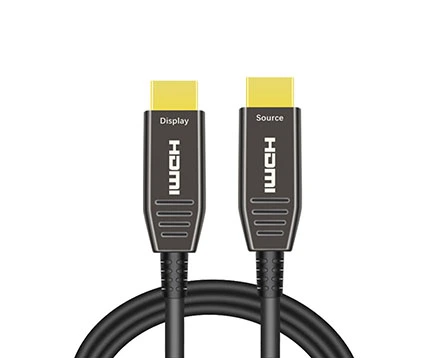
Optical Fiber HDMI
Implements the HDMI protocol over fiber, fully compatible with HDMI 2.1 features.
Targeted at AV integration, including LED video walls, digital signage, high-end home theaters, and broadcast-grade distribution systems.
Backward compatible with HDMI 2.0/1.4 equipment, making it a safe choice for mixed-generation device environments.
Optical Fiber DisplayPort
Implements the DisplayPort protocol over fiber, compliant with DP 1.4 or DP 2.0 depending on the cable.
Widely used in workstations, VR/AR systems, simulation setups, CAD/CAM applications, and multi-monitor productivity environments.
Supports MST (Multi-Stream Transport) for daisy-chaining multiple displays from a single port.
Optical Fiber HDMI (2.1): Up to 48 Gbps, supporting 8K@60Hz or 4K@120Hz with HDR, and DSC (Display Stream Compression) for even higher resolutions.
DisplayPort optical cable (1.4): Up to 32.4 Gbps, supporting 8K@60Hz or 4K@240Hz with DSC.
Optical Fiber DisplayPort (2.0): Up to 80 Gbps, supporting 16K@60Hz or 8K@120Hz, making it the current bandwidth leader for specialized applications.
Key takeaway: If maximum refresh rates are critical for professional graphics or esports-grade systems, DisplayPort has the edge. If wider AV compatibility and integration with consumer/professional playback equipment is the priority, HDMI remains the standard.
HDMI:
19-pin configuration.
Widely supported in AV equipment, projectors, TVs, and professional video processors.
Includes dedicated channels for ARC/eARC (Audio Return Channel) and CEC (Consumer Electronics Control).
DisplayPort:
20-pin configuration, locking mechanism on full-size connectors for secure attachment.
No native ARC/eARC; primarily video and auxiliary data channels.
More common in computing and workstation hardware than in consumer AV gear.
HDMI: Superior audio transport capabilities for AV applications, supporting uncompressed multi-channel audio, Dolby TrueHD, DTS-HD Master Audio, and eARC for object-based formats like Dolby Atmos.
DisplayPort: Supports multi-channel digital audio but is less integrated into home theater ecosystems. Audio transport is secondary to its primary role in high-performance video delivery.
HDMI:
eARC for high-bitrate audio return.
CEC for device control over HDMI.
Extensive EDID management for display compatibility.
DisplayPort:
MST for multiple monitor daisy-chaining.
Adaptive Sync/FreeSync/G-Sync compatibility for smooth gaming and simulation visuals.
More granular color depth and chroma subsampling control in professional GPU drivers.
Both optical fiber HDMI and DisplayPort can reach 30–100 meters or more without loss of full-spec performance, depending on cable quality and design.
A well-engineered HDMI AOC or DisplayPort AOC ensures minimal bit error rate (BER) and immunity to EMI even in electrically noisy environments.
Distance is typically limited by the transceiver performance embedded in the cable heads rather than the fiber itself.
Optical Fiber HDMI is the better fit for:
Broadcast and live event production
LED display walls in exhibitions or sports arenas
Long-run home theater or conference room setups
Medical imaging systems with HDMI-based devices
Optical Fiber DisplayPort is the better fit for:
Engineering and CAD workstations with multi-monitor arrays
VR/AR and simulation systems requiring ultra-high refresh rates
Industrial control rooms using DP-native hardware
Gaming environments pushing 240Hz+ performance
| Feature | Optical Fiber HDMI (2.1) | Optical Fiber DisplayPort (2.1/ 2.0 / 1.4) |
Max Bandwidth | 48 Gbps | 80 Gbps / 54Gbps / 32.4 Gbps |
Max Resolution | 8K@60Hz, 4K@120Hz | 16K@60Hz (2.1) / 8K@60Hz (2.0) / 4K@60Hz (1.4) |
Audio Support | Full AV-grade audio, eARC | Multi-channel audio, no eARC |
Control Protocols | CEC, EDID, eARC | MST, Adaptive Sync |
Target Market | AV integration, broadcast, signage | Workstations, VR/AR, simulation |
Connector Type | 19-pin | 20-pin with latch |
Long-Distance Performance | Excellent with AOC | Excellent with AOC |
While both optical fiber HDMI and optical fiber DisplayPort deliver exceptional performance for long-distance, high-resolution transmission, the protocol — not the fiber — determines their optimal use case.
Choose HDMI when compatibility with AV equipment, HDR video, and immersive audio formats is critical.
Choose DisplayPort when pushing the limits of refresh rate, resolution, and multi-monitor setups in professional computing or simulation environments.
For integrators and project managers, the correct choice is not just about raw bandwidth — it's about ensuring every device in the signal chain operates at peak capability without protocol bottlenecks.
Copyright © Shenzhen Fiberlink Tech Co., Ltd. All Rights Reserved. Trusted Partners:https://www.aocfiberlink.com/