English
eARC, or Enhanced Audio Return Channel, is one of the key features introduced with the HDMI 2.1 standard. It's an upgraded version of ARC (Audio Return Channel), offering significantly higher bandwidth—up to 37 Mbps—which allows it to transmit next-generation lossless audio formats such as: Dolby TrueHD, AC-4, Dolby Atmos, DTS HDMA, DTS:X, LPCM 7.1
In other words, HDMI 2.1 with eARC supports virtually all major audio formats available today, from lossy to fully lossless, and even up to 32 audio channels.This makes understanding thedifference between ARC and eARC increasingly important for users seeking the best audio experience, while choosing a reliable HDMI cable factory ensures optimal performance and long-term stability.
The performance of ARC/eARC depends largely on the TV manufacturer.
Even if a TV claims to support eARC, certain features might be limited or disabled by the brand.
For example:
Sony's 2014 W800B series TVs disabled DDP 5.1 and DTS support.
LG's 2020–2021 OLED models (CX and C1) removed DTS audio functionality altogether.
So if your system fails to output sound for certain audio formats, it's always a good idea to check your TV's manual to confirm what's supported.
Use at least a High-Speed HDMI-certified cable to connect your TV's HDMI IN (ARC/eARC) port to your soundbar or AV receiver's HDMI OUT (TV) port.

Most modern receivers and soundbars will automatically detect the ARC/eARC signal once connected.If there's no sound, consult the manual and manually switch the device to ARC mode.
This setup works best when both your TV and sound system use either HDMI 2.1 or HDMI 2.0 ports.
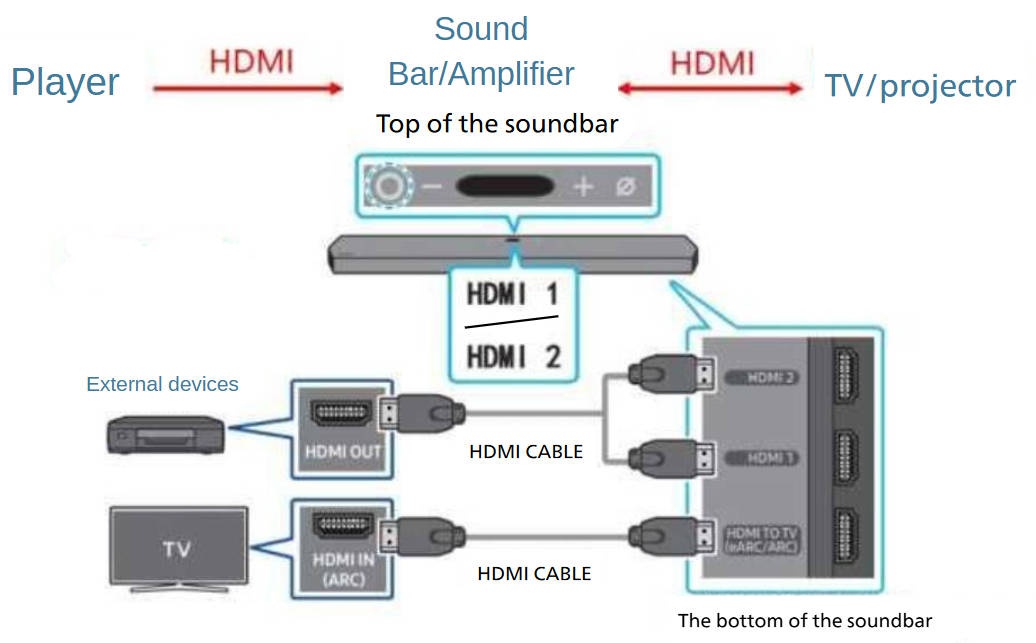
Connect your PS5, Xbox Series X, or Blu-ray player directly to your soundbar or receiver.
In this case, the audio is decoded directly by your AV system, and the video signal is passed through to the TV. This configuration minimizes compatibility issues and allows Dolby Vision or HDR10+ to display correctly on your screen.
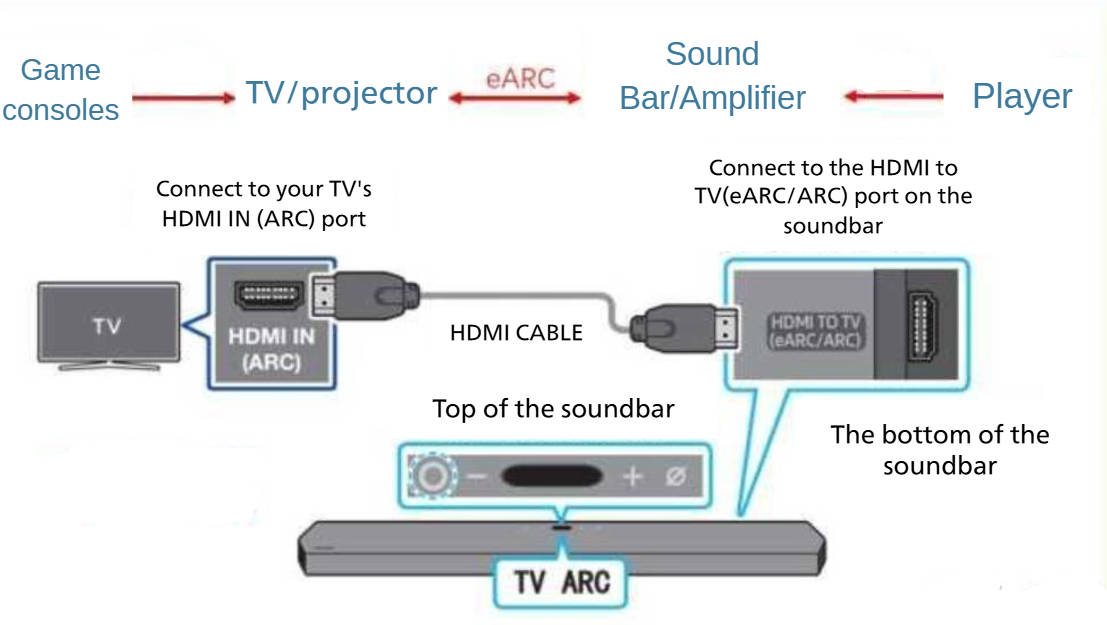
For the best of both worlds, connect your PS5 or Xbox Series X directly to your TV's HDMI 2.1 ports for maximum image quality, and let audio return to your sound system via eARC.
Recommended settings:
PS5: Set audio output to Dolby Digital or LPCM 7.1.
Xbox Series X: Set to Dolby Atmos for optimal performance.
This hybrid setup ensures top-tier graphics while maintaining premium surround sound quality.
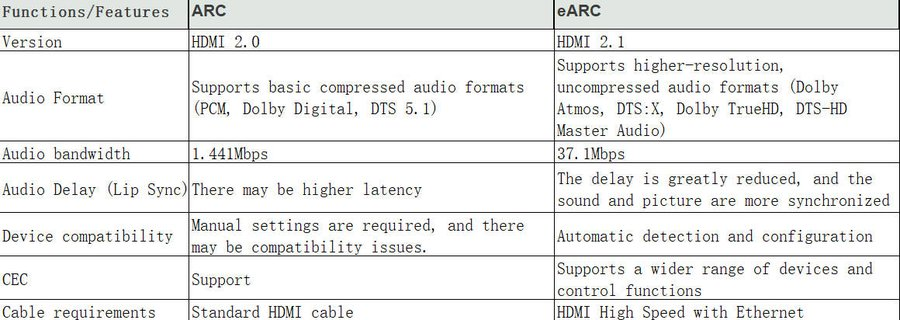
The comparison chart of ARC and eARC difference is as follows:
eARC offers a simple, future-proof way to enjoy high-quality audio and video with fewer cables and better performance. However, the real-world results depend on your TV and sound system's implementation, so always double-check the specs to make sure you're getting the most out of your setup.
Copyright © Shenzhen Fiberlink Tech Co., Ltd. All Rights Reserved. Trusted Partners:https://www.aocfiberlink.com/