English
The short answer is: Yes, active HDMI cables can work with older HDMI devices — but only if they are properly designed and backward compatible.
Most active HDMI cables are built to fully support HDMI 2.1 specifications while maintaining backward compatibility with HDMI 2.0, 1.4, and even earlier versions. However, there are key technical considerations to ensure compatibility, such as power draw, chipset behavior, signal directionality, and handshake protocols.
Let's break down exactly how active HDMI technology interacts with older devices — and what you should know before using one.
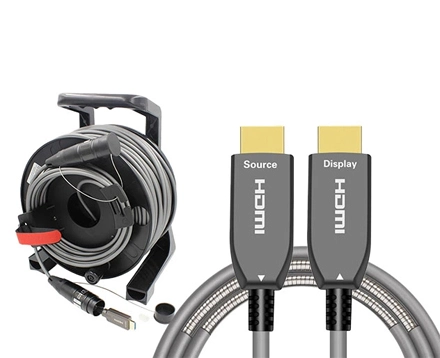
Active HDMI cables are signal-boosting cables with built-in chipsets that enhance transmission strength and integrity. Unlike passive copper cables, which rely on raw electrical transmission, active HDMI cables:
Use signal equalization and amplification to reduce degradation.
Deliver full HDMI 2.1 bandwidth (48 Gbps) over longer distances.
Often employ hybrid fiber-optic construction to prevent signal loss or EMI interference.
These features make active hdmi cables ideal for 8K@60Hz, 4K@120Hz, HDR, and eARC applications — but they can also connect with older 4K, 1080p, or even 720p devices.
HDMI standards are designed to be backward and forward compatible. That means:
A new HDMI 2.1 cable can transmit older HDMI 1.4 or 2.0 signals.
Older devices (e.g., 1080p Blu-ray players, early AV receivers) will simply negotiate at their supported resolution and refresh rate.
In essence, HDMI devices communicate through a handshake process — exchanging supported features like resolution, color depth, HDR formats, and audio protocols — and then defaulting to the highest mutually supported mode.
However, with active HDMI cables, there are a few added layers to consider.
The cable's internal chipset design
High-quality active HDMI cables are engineered to support HDMI 1.4–2.1 standards automatically.
Poorly designed cables may not downshift properly when connected to older ports.
Device power output
Active HDMI cables draw small amounts of power from the source device (typically ≤50mA).
Older HDMI ports might not supply sufficient current for the internal chip to operate, causing signal failure.
Signal directionality
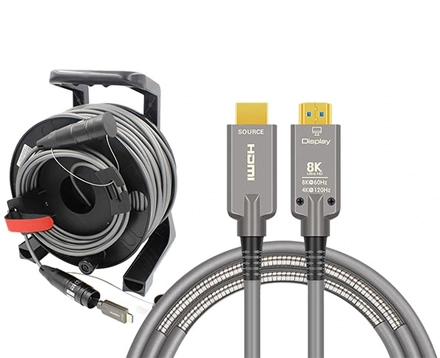
Active HDMI cables are directional (Source → Display).
If connected backward or through legacy splitters, the signal won't pass correctly.
In short: As long as your older device provides standard HDMI output power and the cable is certified for backward compatibility, it will work seamlessly.
| HDMI Version | Typical Bandwidth | Supported by Active HDMI? | Notes |
HDMI 1.4 | 10.2 Gbps | Yes | 1080p and 4K@30Hz supported |
HDMI 2.0 | 18 Gbps | Yes | 4K@60Hz, HDR10 supported |
HDMI 2.1 | 48 Gbps | Yes | Full 8K@60Hz, 4K@120Hz supported |
Active HDMI cables automatically adjust to the bandwidth the source and display negotiate. The chipset inside ensures signal integrity, even when operating far below its maximum capacity.
Let's say you have:
A 4K TV (HDMI 2.0)
An older Blu-ray player (HDMI 1.4)
A 10-meter active hdmi cable designed for 8K HDMI 2.1
Even though the cable supports up to 48 Gbps, the handshake between devices will settle at 10.2 Gbps (HDMI 1.4), carrying a 1080p or 4K@30Hz signal — and it will still work perfectly fine.
While compatibility is typically straightforward, certain situations may cause problems. Here's how to identify and fix them.
Possible Cause:
Older source devices may not supply enough voltage to power the internal chipset of an active HDMI cable.
Solution:
Use a powered HDMI repeater or external power injector to boost the signal.
Choose an active cable designed for low-power compatibility (under 5V, <50mA).
Possible Cause:
Signal equalization may be tuned for higher bandwidth, causing instability at low-bandwidth signals.
Solution:
Replace with a certified Ultra High Speed HDMI Cable that supports backward versions.
Verify all devices are using the latest HDMI firmware (some legacy AVRs need updates).
Possible Cause:
The cable is connected in reverse.
Solution:
Ensure "Source" is connected to the output device (Blu-ray, GPU, console).
"Display" connects to the TV, projector, or monitor.
This simple mistake accounts for over 40% of HDMI troubleshooting issues in professional installations.
Possible Cause:
Older HDMI devices may have outdated EDID (Extended Display Identification Data) protocols.
Solution:
Power-cycle both devices to re-establish the handshake.
If possible, insert an HDMI switch or repeater between devices to manage signal negotiation.
Yes. Active HDMI cables are backward compatible with 4K and 1080p devices. They simply run at the lower data rate required by the source and display.
Yes — as long as the HDMI port supplies standard output power and the cable supports HDMI 1.4 backward compatibility.
No, they draw power directly from the HDMI port. However, if the source device is very old or underpowered, an external HDMI power booster may be required.
Yes, but ensure the receiver's HDMI version and passthrough features match your source and display. Some older receivers may downscale resolution or block advanced formats like HDR10+.
Yes. Because active HDMI cables contain amplification and noise filtering circuits, they maintain a clean signal even across long runs.
Look for Ultra High Speed HDMI certification, ensuring compliance with HDMI 2.1 specs and backward compatibility.
Before running cables through walls or conduits, test them with all intended devices to confirm signal handshake and power compatibility.
Even though active cables perform better over long distances, using unnecessarily long cables can complicate signal equalization.
Always double-check Source → Display orientation during setup.
Even though most active HDMI cables are shielded, avoid routing near high-voltage power lines.
When connecting active hdmi cables to legacy devices, two electronic layers determine compatibility:
Most HDMI 1.4/2.0 devices provide ~5V and 50mA — enough for most active HDMI circuits. However, if the chipset inside the cable requires more, it may fail to initialize. High-end active cables mitigate this by including low-power mode chipsets that adapt dynamically.
Older HDMI devices may send outdated or incomplete EDID information. Modern active cables handle this by buffering and stabilizing the EDID signal, ensuring both ends agree on a supported format.
In industrial applications, this EDID stability is crucial for broadcast control systems, hospital imaging, and educational display networks, where older devices often coexist with 4K or 8K displays.
An installer connects a new 8K projector to a 4K AV receiver using a 20m active HDMI cable.
The signal automatically adjusts to HDMI 2.0 (4K@60Hz).
No converters or extenders required.
A 2016 laptop (HDMI 1.4) connects to an 8K-ready video wall using a fiber active HDMI.
The AOC's chipset handles the power and handshake perfectly.
The display receives stable 1080p output with no lag.
Legacy broadcast switchers using HDMI 2.0 send 4K feeds to new 8K monitors through hybrid active HDMI — achieving full synchronization and zero interference in EMI-heavy environments.
| Parameter | Active HDMI Cable | Passive HDMI Cable |
Backward Compatibility | Yes, if chipset supports HDMI 1.4/2.0 | Yes (inherent) |
Distance Capability | 10–100m (depending on type) | 3–5m (max stable) |
Power Requirement | Draws low power from source | None |
Signal Equalization | Automatic | None |
EMI Immunity | High | Low |
Recommended For | Long runs, mixed old-new setups | Short, simple connections |
When pairing with older devices, look for the following technical indicators:
Backward Compatibility Label: Explicit support for HDMI 1.4 or HDMI 2.0.
Chipset Manufacturer Disclosure: Reputable brands like Parade, Analogix, or Silicon Line guarantee adaptive equalization.
Low-Power Operation (<50mA): Ensures performance even with older HDMI ports.
Directional Markings: Clearly labeled "Source" and "Display."
Testing Certifications: HDMI Licensing Administrator (HDMI LA) approval or DPL Labs certification.
Yes — active HDMI cables can work backward with older devices, provided they are designed for full backward compatibility and receive adequate power.
They offer a unique balance between advanced signal amplification and legacy support, bridging the gap between older HDMI 1.4/2.0 devices and the latest 8K HDMI 2.1 displays.
In professional AV, broadcasting, and high-end home theaters, choosing certified, low-power active HDMI cables ensures seamless communication between generations of equipment — with no loss of quality, no interference, and complete future-proofing.
If your setup includes a mix of older sources and new displays, the smartest investment is clear:
choose active HDMI cables that guarantee full backward compatibility and stable performance across all HDMI generations.
Copyright © Shenzhen Fiberlink Tech Co., Ltd. All Rights Reserved. Trusted Partners:https://www.aocfiberlink.com/