English
When upgrading your home theater, gaming setup, or AV system, you'll likely encounter two types of HDMI cables: Active HDMI 2.1 and Standard HDMI 2.1. The quick answer?
If your connection length is under 3 meters, a standard HDMI 2.1 cable will work fine.
If you need longer, electronic interference-free 8K or 4K@120Hz performance, you should choose active HDMI cables, which are built specifically to maintain signal quality over long distance up to 500m.
Let's dive deeper into the differences, technologies, and use cases that determine which one is right for your setup.
Before comparing the cable types, let's clarify what HDMI 2.1 actually means.
HDMI 2.1 is the latest major specification that supports:
8K@60Hz and 4K@120Hz resolutions
48 Gbps bandwidth
Dynamic HDR formats like HDR10+ and Dolby Vision
eARC (enhanced Audio Return Channel)
VRR, ALLM, QFT for gaming and real-time applications
Both active and standard HDMI cables can meet these specs — the difference lies in how they deliver the signal.
Active HDMI cables contain built-in signal amplification and equalization chipsets inside the connector heads. This internal circuitry allows them to:
Boost and process the HDMI signal as it travels through the cable.
Maintain stable transmission over long distances (10–30 meters or more).
Prevent degradation caused by resistance, interference, or signal attenuation.
In short, active hdmi cables are the "smart" version of HDMI — engineered to overcome the physical limits of copper signal transmission.
Standard (or passive) HDMI 2.1 cables have no built-in electronics. They transmit the signal directly through copper conductors.
Advantages:
Simple, plug-and-play operation.
No power draw or directionality.
Lower cost.
Limitations:
Reliable only up to 3–5 meters for full 48 Gbps transmission.
Prone to signal loss or flicker at longer lengths.
Can suffer from electromagnetic interference (EMI).
| Feature | Active HDMI 2.1 Cable | Standard HDMI 2.1 Cable |
Signal Transmission | Amplified (with chipset for transmitter and receiver, hybrid or pure fiber as the transmission media) | Direct (no amplification) |
Max Reliable Length | 500m | 3m |
Bandwidth | Full 48 Gbps | Full 48 Gbps (short distance) |
Signal Loss | Zero | Noticeable over 5m |
Interference Resistance | EMI-free due to fiber | Moderate |
Directionality | Yes (Source → Display) | No |
Power Source | From HDMI port (no external power) | Not required |
Flexibility | More flexible | Difficult |
Cost | Higher | Lower |
The main factor that determines which cable you should choose is distance.
Up to 3 meters: Standard HDMI 2.1 performs perfectly, even for 8K signals.
5–10 meters: Some high-quality copper cables may still work, but with risks of flickering or signal dropouts.
Over 10 meters: Only active hdmi cables can maintain stable 8K@60Hz or 4K@120Hz transmission.
That's because electrical signals lose strength over long distances — active HDMI cables compensate for this with internal amplification.
Inside each connector head of an active HDMI cable are microchip-based signal processors that perform two tasks:
Equalization and amplification – restoring weakened signals before they degrade.
Noise filtering – reducing interference from external electronic sources.
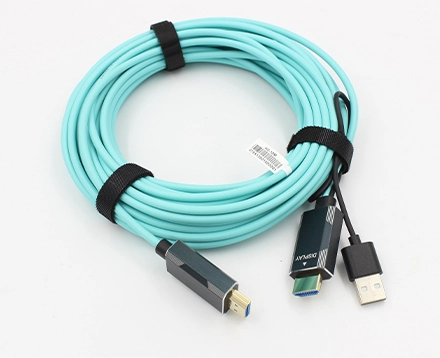
Some advanced models (especially AOCs – Active Optical Cables) even convert electrical signals into light for fiber-optic transmission, achieving up to 100 meters of lossless performance.
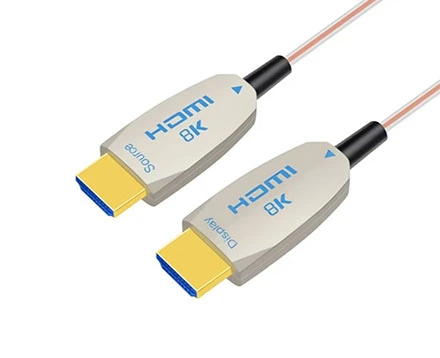
Note: Active HDMI cables are directional — one end labeled "Source" must connect to the output device (e.g., Blu-ray player, GPU, console), and the other labeled "Display" connects to the TV or monitor.
If you're connecting a receiver to a projector across a 15-meter ceiling run, a passive copper cable won't deliver stable 8K.
An active HDMI 2.1 cable ensures full Dolby Vision and Dolby Atmos transmission without flicker or dropouts.
Modern gaming consoles like the PS5 and Xbox Series X demand 4K@120Hz or 8K@60Hz with VRR and HDR.
Active HDMI cables ensure you get the lowest latency and full dynamic range, even if your console sits several meters away from your display.
Conference rooms and auditoriums often require long HDMI runs. Active HDMI cables maintain reliable video quality across distances that would overwhelm standard copper cables.
In production or broadcast studios, signal integrity is non-negotiable. Active HDMI cables — especially hybrid AOCs — are used for long, interference-free, real-time transmission.
Yes. Active HDMI cables amplify and process the signal to maintain full HDMI 2.1 performance over long distances. Passive cables cannot achieve this beyond 5m.
Yes. They only work one way: Source → Display. Plugging them in backwards won't damage the devices, but they won't transmit video.
No external power supply is needed. The chipsets draw minimal power from the HDMI port itself.
Absolutely. Active HDMI 2.1 cables are backward compatible with HDMI 2.0 and 1.4 devices.
They do not introduce measurable latency. In fact, they can reduce jitter and data errors, ensuring more consistent frame delivery for gaming and professional use.
Always connect the labeled "Source" and "Display" ends correctly.
Active cables often contain delicate components — avoid kinking or bending sharply.
Even though active HDMI is resistant to EMI, maintaining spacing from high-voltage cables ensures peak performance.
For wall or ceiling runs, test at full 8K@60Hz or 4K@120Hz output to verify stability before final setup.
For professional environments, document directionality and cable type for future maintenance.
Delivering stable, ultra-high-definition video from AV receivers to projectors across long distances.
Used for transmitting 8K or 4K feeds across large operational spaces without delay or distortion.
Ensures zero-latency signal for live event cameras and monitors, even at extended distances.
A must for large-scale displays in shopping malls, airports, or stadiums.
Critical for high-resolution imaging systems where EMI could distort visuals.
There are still cases where standard HDMI 2.1 is the better choice:
Short desk setups (PC to monitor within 2m).
Low-interference environments.
Portable applications where cable flexibility is key.
Budget-sensitive consumer use.
But as soon as you exceed 5 meters, you'll face the physical limits of copper — and that's where active HDMI cables pay for themselves.
| Use Case | Recommended Cable Type | Rationale |
8K Home Theater Projector | Active HDMI 2.1 | Long run, high bandwidth |
PS5 / Xbox Series X to 4K TV (≤3m) | Standard HDMI 2.1 | Short, simple connection |
Corporate Presentation System | Active HDMI 2.1 | Long, stable transmission |
Broadcast or Control Room | Active HDMI (AOC preferred) | EMI immunity, zero latency |
Desk Setup (PC + Monitor) | Standard HDMI 2.1 | Cost-efficient, short run |
Buying cheap uncertified cables.
Not all cables labeled "8K HDMI" meet true HDMI 2.1 standards. Look for Ultra High Speed HDMI certification.
Ignoring directionality.
Active HDMI cables won't work if reversed.
Bending beyond limits.
Especially in AOC designs, this can permanently damage fibers.
Mixing HDMI 2.0 and 2.1 devices without checking compatibility.
Always confirm both source and display support HDMI 2.1 features.
The decision between Active HDMI 2.1 and Standard HDMI 2.1 depends mainly on distance and performance requirements.
For short, budget-friendly connections, a standard HDMI 2.1 cable is sufficient.
For long runs, professional installations, or 8K-ready setups, active hdmi cables deliver the reliability, clarity, and future-proofing you need.
In professional AV environments — home theaters, studios, control rooms, and digital signage — the move toward active HDMI 2.1 is already the new standard.
So if your goal is maximum performance and zero compromise, the choice is simple:
Choose active HDMI cables — and invest once, for the future.
Copyright © Shenzhen Fiberlink Tech Co., Ltd. All Rights Reserved. Trusted Partners:https://www.aocfiberlink.com/