English
When choosing between 8K HDMI AOC (Active Optical Cables) and Copper HDMI 2.1 cables, the short answer is this:
For short connections (≤3 meters), a copper HDMI 2.1 cable is sufficient and cost-effective.
For long-distance, interference-free 8K transmission (up to 500 meters), active HDMI cables — specifically 8K HDMI AOC cables — are the clear choice.
In other words: copper cables are for convenience; AOC cables are for performance.
Let's explore the technical, operational, and commercial differences in detail — and help you decide which is right for your setup.

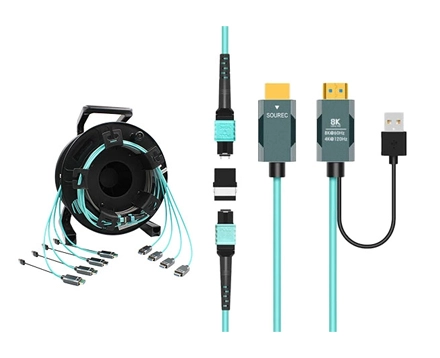
An Active Optical Cable (AOC) combines fiber optics and copper wiring to transmit HDMI signals as light, not electricity. Inside the connector head, an integrated chipset converts electrical signals to optical for transmission, then back to electrical at the display end.
This hybrid design gives AOCs two key advantages:
They can transmit over long distances (up to 500m) with zero signal degradation.
They're immune to electromagnetic interference (EMI) — a major limitation of copper.
Essentially, an 8K HDMI AOC cable is an active HDMI cable designed for high-speed, long-distance, high-bandwidth transmission.
Traditional HDMI cables rely solely on copper conductors to transmit electrical signals between devices. While copper is excellent for short runs, it introduces problems at higher bandwidths:
Signal attenuation increases with length.
Interference from nearby power lines or electronics causes visual noise.
Heat and resistance distort high-frequency 8K signals.
As a result, most HDMI 2.1 copper cables are only reliable up to 1–3 meters for full 48 Gbps performance.
| Feature | 8K HDMI AOC (Active Optical Cable) | Copper HDMI 2.1 Cable |
Transmission Type | Optical (fiber + copper hybrid) | Electrical (pure copper) |
Signal Boosting | Built-in chipset (active) | Passive |
Max Bandwidth | 48 Gbps (full HDMI 2.1) | 48 Gbps (short runs only) |
Max Reliable Length | 500m | 0.1–3m |
EMI/RFI Resistance | Immune | Susceptible |
Latency | Negligible | Negligible |
Flexibility | Lightweight, slim | Heavier, less flexible |
Power Requirement | Draws power from HDMI port | No external power |
Durability | Sensitive to sharp bends | More rugged physically |
Cost | Higher | Lower |
In practice: AOCs are purpose-built for professional installations, while copper HDMI cables serve short consumer setups.
Copper HDMI cables struggle beyond 5m for full 8K@60Hz or 4K@120Hz.
By contrast, 8K HDMI AOC cables maintain perfect signal quality for 10–500 meters or more — ideal for:
Ceiling-mounted projectors
AV racks in home theaters
Conference rooms and control systems
Because AOCs convert electrical signals to optical, they are immune to electromagnetic and radio frequency interference. This guarantees flicker-free video even in EMI-heavy environments like studios, broadcast centers, or hospitals.
Both can support the HDMI 2.1 standard (48 Gbps), but AOCs sustain that speed over distance, while copper HDMI degrades beyond 3–5m.
AOCs are thinner, lighter, and easier to route, especially in tight spaces or walls. Copper HDMI becomes thick and stiff at long lengths due to shielding.
Copper cables carry electrical current, generating heat during high-speed data transfer. AOCs transmit light signals, producing virtually no heat — improving long-term reliability.
Short connections (≤3m) between TV and console or receiver.
Budget-conscious setups that don't require long runs.
Plug-and-play devices like gaming consoles or laptops.
Long-distance transmission (≥10m) for projectors or AV racks.
Professional installations in studios, auditoriums, or stadiums.
Environments with EMI — hospitals, control rooms, data centers.
Future-proofing for 8K displays, high frame rate gaming, and HDR10+.
If you're installing HDMI cables behind walls or ceilings, AOCs are the only logical choice — once installed, you'll never need to worry about signal integrity again.
Yes. Active HDMI cables (like AOCs) amplify and convert the signal to maintain quality over long distances. Passive copper HDMI cables cannot do this.
Absolutely. For 8K@60Hz or 4K@120Hz, active HDMI cables ensure the full 48 Gbps bandwidth, even over 30–100m runs.
No external power source is needed — they draw low voltage directly from HDMI ports.
Yes. AOCs are backward compatible with older HDMI standards (2.0, 1.4).
In high-end home cinemas, AV equipment is often stored in separate racks. 8K HDMI AOCs run long distances to projectors or TVs, delivering Dolby Vision + Atmos without degradation.
Studios demand zero-latency, high-bandwidth transmission across multiple monitors and editing systems. AOCs guarantee consistent output with zero flicker, even at 8K.
For meeting rooms, auditoriums, and classrooms, where display distances exceed 10m, AOCs prevent signal dropout during presentations.
AOCs maintain full-resolution 4K/8K output between broadcast cameras, switchers, and LED walls — ensuring no sync or frame loss during live events.
Fiber-based HDMI avoids EMI, ensuring clean, interference-free imaging in hospitals and surgical rooms.
Since active HDMI cables include sensitive optical fibers, proper installation ensures optimal performance:
Check Directionality: Connect "Source" to output (e.g., GPU) and "Display" to monitor/projector.
Respect Bend Radius: Avoid tight curves (follow ≥30mm radius guideline).
Don't Overpull: Fiber strands can be damaged by excessive force.
Pre-Test at Full Bandwidth: Verify 8K@60Hz or 4K@120Hz stability before sealing walls.
Keep Away from Power Lines: Prevent EMI issues in hybrid fiber-copper designs.
While AOCs cost more upfront, they provide long-term ROI:
Durability: Fiber doesn't corrode like copper.
Future-Proofing: Supports HDMI 2.1 and beyond (potentially 10K-ready).
Reduced Maintenance: Once installed, no need for repeat replacements or signal boosters.
Meanwhile, copper HDMI may require replacements or extenders as bandwidth demands grow, leading to higher lifecycle costs.
With the growing adoption of 8K TVs, next-gen gaming consoles, and immersive content formats (HDR10+, VRR, 120Hz), demand for active HDMI cables is accelerating.
Industry trends show:
8K content and displays are expected to grow 30%+ annually through 2030.
Copper cable sales are plateauing due to bandwidth limitations.
AOCs are becoming the new standard for both residential and commercial AV projects.
In professional AV design, the transition from copper to active optical HDMI mirrors what happened with Ethernet: fiber became the dominant medium for reliability, speed, and scalability.
So, which should you buy — 8K HDMI AOC or Copper HDMI 2.1?
Choose Copper HDMI 2.1 if:
Your connection length is ≤3m.
Budget is limited.
You only need simple 4K connections.
Choose 8K HDMI AOC if:
You need long-distance, high-bandwidth reliability.
You're setting up a home theater, studio, or large venue.
You want to future-proof your installation for 8K and beyond.
For professionals and performance-focused users, active hdmi cables — particularly 8K HDMI AOCs — are the superior, future-ready choice.
In today's 8K era, the difference between active HDMI cables and traditional copper HDMI 2.1 cables is not subtle — it's decisive.
Copper HDMI is still useful for short, everyday setups.
But AOC HDMI cables deliver the distance, stability, and bandwidth modern systems demand.
From home theaters to broadcast studios and stadium-scale installations, 8K HDMI over fiber is redefining how professionals move high-definition video signals.
If you want a system that performs flawlessly — now and years from now — invest in 8K HDMI AOC technology.
Copyright © Shenzhen Fiberlink Tech Co., Ltd. All Rights Reserved. Trusted Partners:https://www.aocfiberlink.com/