English
If you're deciding between an 8K HDMI fiber optic cable and a traditional copper HDMI cable, the key difference comes down to performance over distance.
Copper HDMI cables work well for short runs (under 3–5 meters) but suffer from signal loss and interference at longer lengths.
Fiber optic HDMI cables use light instead of electrical signals, enabling lossless 8K and 4K@120Hz transmission over 30–100 meters or more, with complete immunity to electromagnetic interference (EMI).
In other words: if your setup involves long cable runs, professional AV, or 8K-ready equipment, fiber is the superior choice. For short, budget-friendly home setups, copper may still suffice.
Let's break this down in detail.
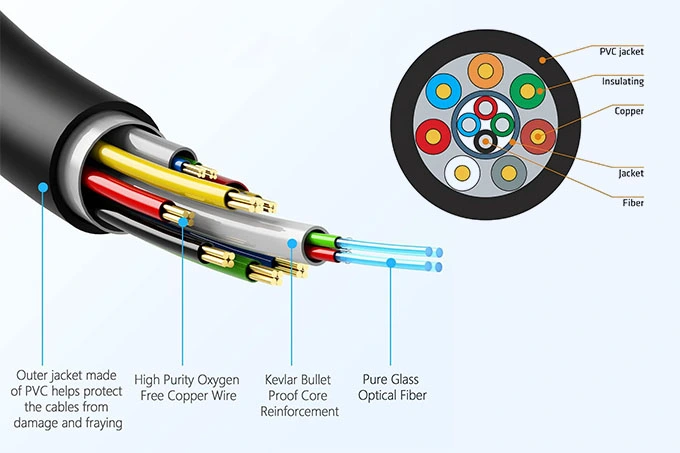
The HDMI standard has rapidly evolved from 1080p to 4K, and now 8K with HDMI 2.1. This means:
Bandwidth requirements jumped from 10.2 Gbps (HDMI 1.4) to 18 Gbps (HDMI 2.0) and now 48 Gbps (HDMI 2.1).
Copper HDMI cables quickly hit physical limits—signal degradation, attenuation, and EMI become major issues beyond a few meters.
Fiber optic HDMI cables bypass these limitations by transmitting signals as pulses of light, delivering stable performance across much greater distances.
For AV integrators, system designers, and even advanced home theater enthusiasts, this distinction determines whether a setup will run smoothly—or cause endless troubleshooting.
An 8K HDMI fiber optic cable isn't just a different material; it's a different technology. Here's the process:
Electrical-to-Optical Conversion:
The source device (e.g., Blu-ray player, PS5, RTX GPU) sends out an HDMI electrical signal. The cable's built-in chipset converts it into optical signals.
Transmission Over Fiber:
Light pulses travel through glass or plastic fiber strands, unaffected by resistance or interference.
Optical-to-Electrical Conversion:
At the display end, another chipset converts the optical signal back into a standard HDMI electrical signal.
Stable Output:
The display (TV, projector, monitor) receives a clean, lossless 8K signal, even over long runs.
Importantly, this process happens in real-time with no measurable latency.
| Feature | Traditional Copper HDMI | 8K HDMI Fiber Optic Cable |
Transmission Medium | Electrical signals (copper wires) | Light signals (fiber strands) |
Max Reliable Length (8K) | 3–5m (sometimes up to 7m) | 30–100m+ |
Bandwidth Support | Limited at long distances | Full HDMI 2.1 (48 Gbps) |
Signal Loss | High beyond 5m | Negligible |
Interference | Susceptible to EMI/RFI | Immune |
Weight & Flexibility | Thicker, heavier | Lighter, thinner |
Durability | Sturdy under bending | Sensitive to sharp bends |
Cost | Lower | Higher |
Installation | Simple | Directional (Source → Display) |
Use Case | Short-distance consumer setups | Professional, long-distance, interference-heavy environments |
Copper HDMI cables degrade quickly at high bandwidths.
Fiber optic HDMI maintains full 48 Gbps across 30–100m runs, essential for auditoriums, conference halls, and home theaters with projectors.
Copper HDMI cables can pick up EMI from nearby electronics or power cables.
Fiber HDMI is immune to interference, making it reliable in industrial facilities, data centers, and hospitals.
Delivers the features demanded by next-gen gaming and home cinema:
8K@60Hz and 4K@120Hz
HDR10+, Dolby Vision
VRR (Variable Refresh Rate)
ALLM (Auto Low Latency Mode)
eARC for lossless audio
Copper cables of long lengths are heavy and inflexible.
Fiber HDMI cables are slim and lightweight, perfect for routing through ceilings or conduits.
Copper HDMI shouldn't be dismissed completely. For:
Short distances (≤3m) — such as connecting a gaming console to a nearby TV.
Budget-sensitive setups — copper is significantly cheaper.
Non-8K content — 1080p or even 4K@60Hz signals can still run reliably on short copper HDMI cables.
But if you're planning for 8K or long-term investment, fiber is the safer choice.
No external power adapter is needed. The cable's chipsets draw low voltage directly from the HDMI ports. This makes installation simple—though remember that fiber HDMI cables are directional (marked Source → Display).
Running HDMI across walls or ceilings to connect AV receivers and projectors.
Fiber ensures full Dolby Vision and Dolby Atmos support without dropouts.
Conference rooms, lecture halls, and auditoriums often require long HDMI runs from racks to displays.
Fiber optic HDMI avoids costly extenders or repeaters.
Shopping malls, airports, stadiums—locations with large displays spread far apart.
Fiber ensures consistent UHD content delivery.
8K HDMI fiber optic cables transmit ultra-high-resolution imaging without interference, crucial for diagnostic accuracy.
Live event production requires zero-latency, interference-free HDMI transmission.
Fiber is now standard in many studio and tournament setups.
Yes, especially for long-distance and high-resolution (8K/4K@120Hz) use. Copper works fine for short runs, but fiber optic HDMI ensures stability at any distance.
Absolutely. They are backward compatible and work with 1080p, 4K, and 8K devices.
They are more sensitive to sharp bends than copper cables. Following the minimum bend radius is crucial during installation.
No. Signal conversion and transmission are instantaneous, with negligible latency, suitable for gaming and broadcasting.
Yes. It supports the full HDMI 2.1 specification and will handle future 8K and potentially 10K formats.
Here's a decision-making framework I often recommend to clients:
Choose Copper HDMI if:
Your cable run is ≤3m.
You only need up to 4K@60Hz.
You want a lower-cost solution.
Choose 8K HDMI Fiber Optic if:
Your cable run exceeds 5m.
You require 8K@60Hz or 4K@120Hz performance.
You're in an environment with high EMI.
You're building a professional or long-term installation.
The decision between an 8K HDMI fiber optic cable and a copper HDMI cable isn't about which one is "better" overall—it's about choosing the right tool for the right job.
Copper HDMI cables remain cost-effective for short-distance, consumer-grade setups.
Fiber HDMI cables are the industry standard for long-distance, high-bandwidth, interference-free transmission—the only real choice for professional AV, home theaters, medical imaging, and broadcast applications.
If your business or project requires reliability, future-proofing, and 8K readiness, investing in an 8K HDMI fiber optic cable will save you troubleshooting costs and ensure seamless performance for years to come.
Copyright © Shenzhen Fiberlink Tech Co., Ltd. All Rights Reserved. Trusted Partners:https://www.aocfiberlink.com/