English
HDMI is the best choice for consumer electronics and universal compatibility, while DisplayPort delivers higher bandwidth, better support for high refresh rates, and superior performance for gaming and professional displays.
When extended over long distances, both benefit significantly from fiber optics—making optical DisplayPort cable and optical fiber HDMI cable essential for modern high-resolution setups.
HDMI (High-Definition Multimedia Interface) and DisplayPort were developed to solve the same problem—high-quality digital audio/video transmission—but with different priorities:
HDMI: Designed for TVs, home entertainment, and consumer electronics
DisplayPort: Built for PCs, gaming, and professional monitors
With the rise of 8K video, ultra-wide monitors, 240Hz+ refresh rates, and immersive gaming, both standards have evolved rapidly.
Traditional copper cables face limitations:
Signal degradation over distance
Electromagnetic interference (EMI)
Bulkiness at high bandwidth
Fiber optic technology addresses all of these, enabling:
Stable long-distance transmission (10m–100m+)
Ultra-high bandwidth
Minimal signal loss
This is why displayport optical cable and optical fiber HDMI cable are becoming mainstream in 2026.
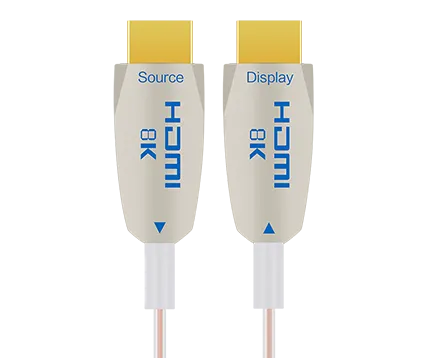
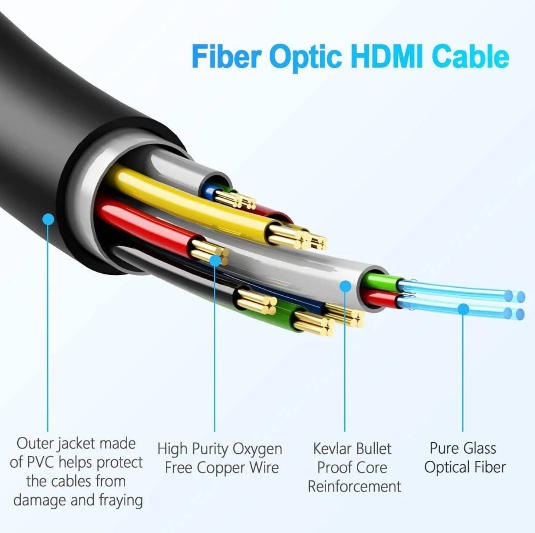
An optical fiber HDMI cable converts electrical signals into light signals for transmission through fiber optics, then converts them back at the receiving end.
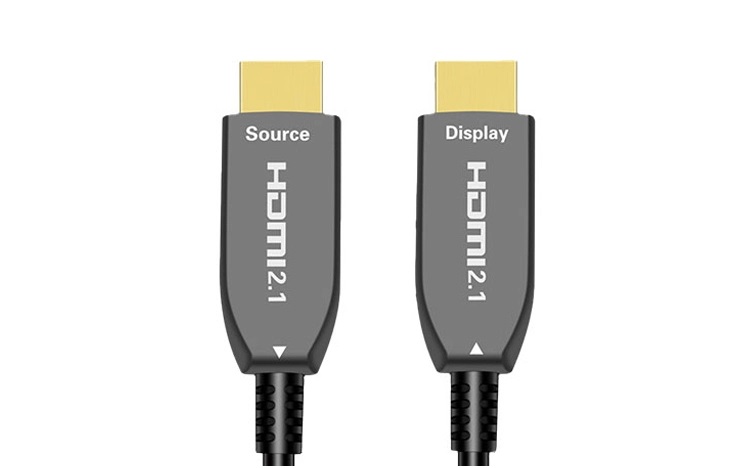
Hybrid design (fiber + copper for power/control)
Supports HDMI 2.1 bandwidth (up to 48 Gbps)
Thin, lightweight, and flexible
Reliable 4K/8K transmission over long distances
Immune to EMI (ideal for data centers, AV installations)
No signal degradation compared to copper HDMI
| Feature | Copper HDMI | Optical Fiber HDMI Cable |
|---|---|---|
| Max distance | ~5–10m (4K stable) | 50m–100m+ |
| Signal stability | Degrades over distance | Highly stable |
| EMI resistance | Low | High |
| Thickness | Thick | Thin/light |
Curious about the key differences between an optical fiber HDMI cable and a traditional copper HDMI cable? Check out this in-depth guide: Fiber HDMI vs Copper HDMI.
A fiber optic DisplayPort cable (also called DisplayPort fiber optic cable) uses optical transmission to deliver DisplayPort signals over long distances without loss.
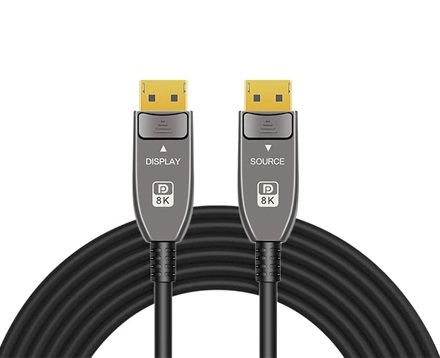
Supports DisplayPort 1.4 and 2.1 standards
Bandwidth up to 80 Gbps (DP 2.1 UHBR)
Plug-and-play with active signal conversion
Ideal for high refresh rate gaming (144Hz, 240Hz, 360Hz)
Enables long-distance workstation setups
Maintains full resolution and color depth
Multi-monitor setups
Video editing and color grading
Esports environments
| Feature | HDMI 2.1 | DisplayPort 2.1 |
|---|---|---|
| Max Bandwidth | 48 Gbps | 80 Gbps |
| Max Resolution | 8K @ 60Hz / 4K @ 120Hz | 16K (compressed), 8K @ 120Hz |
| Connector | Compact, universal | Larger, PC-oriented |
| Audio Support | Excellent (Dolby Atmos, eARC) | Excellent |
| Adaptive Sync | VRR | Native (FreeSync, G-Sync) |
| Daisy Chaining | No | Yes |
| Typical Use | TVs, consoles | PCs, monitors |
HDMI: Smaller, widely adopted
DisplayPort: Locking mechanism, more secure
DisplayPort clearly leads in raw bandwidth—critical for:
4K at 240Hz
8K at high refresh rates
Multi-display setups
As for HDMI vs DisplayPort resolution:
HDMI excels in TVs and cinematic use
DisplayPort dominates gaming and professional workflows
Both support:
High-definition audio
Multi-channel formats
HDMI has a slight edge with eARC in home theater setups.
As for HDMI vs DisplayPort for gaming, DisplayPort provides:
Native adaptive sync support
Better compatibility with high-end GPUs
This makes it the preferred option for competitive gaming.
HDMI 2.1 widely adopted in TVs and consoles
DisplayPort 2.1 emerging in high-end GPUs and monitors
Industry trend: DisplayPort is pushing performance boundaries, while HDMI dominates consumer ecosystems.
Choose HDMI (or optical fiber HDMI cable) if:
You’re connecting a TV or sound system
You need ARC/eARC
You want universal compatibility
Choose fiber optic DisplayPort cable if:
You play competitive games
You use high refresh rate monitors
You want the lowest latency and best sync
Choose:
Optical DisplayPort cable → for PCs and monitors
Optical fiber HDMI cable → for TVs and AV systems
Both are essential for:
Conference rooms
Digital signage
Control rooms
HDMI: TVs, consoles, projectors
DisplayPort: PCs, GPUs, professional monitors
Always verify:
Port version (HDMI 2.1 vs DP 1.4/2.1)
Cable certification
Fiber cables offer:
Longer transmission distance
Higher bandwidth capacity
Better signal integrity
Short distances (<3m)
Basic 1080p or 4K setups
8K video
High refresh rate gaming
Professional AV installations
HDMI is designed for consumer electronics and broad compatibility, while DisplayPort focuses on higher bandwidth, better refresh rates, and advanced display features.
Image quality is the same at equal resolutions. However, DisplayPort supports higher bandwidth, enabling better performance at extreme resolutions and refresh rates.
Choose fiber when:
Cable length exceeds 10 meters
You need stable 4K/8K transmission
Signal interference is a concern
Yes, for high-performance and long-distance applications. Copper is still cost-effective for short runs.
Because HDMI is standard in TVs, consoles, and consumer devices, while DisplayPort is mainly used in PCs and professional environments.
HDMI and DisplayPort are not competitors—they serve different ecosystems:
HDMI dominates home entertainment and universal connectivity
DisplayPort leads in performance, gaming, and professional use
With the rapid adoption of fiber optic transmission, both technologies are entering a new phase:
Optical fiber HDMI cable enables long-distance home and commercial AV
DisplayPort optical cable unlocks ultra-high refresh rate and resolution without compromise
For users building future-proof systems in 2026 and beyond, fiber optic solutions are no longer optional—they are the standard for high-performance connectivity.
Copyright © Shenzhen Fiberlink Tech Co., Ltd. All Rights Reserved. Trusted Partners:https://www.aocfiberlink.com/