English
As technology has evolved, computers and game consoles have shifted from traditional DVI to modern HDMI. Although they look different, both are designed to transmit uncompressed digital video to displays. The key difference is that HDMI carries both audio and video, while DVI supports video only. Despite its limitations, DVI is still used in some professional settings. So which one is right for you? This article will compare their features to help you make an informed choice.
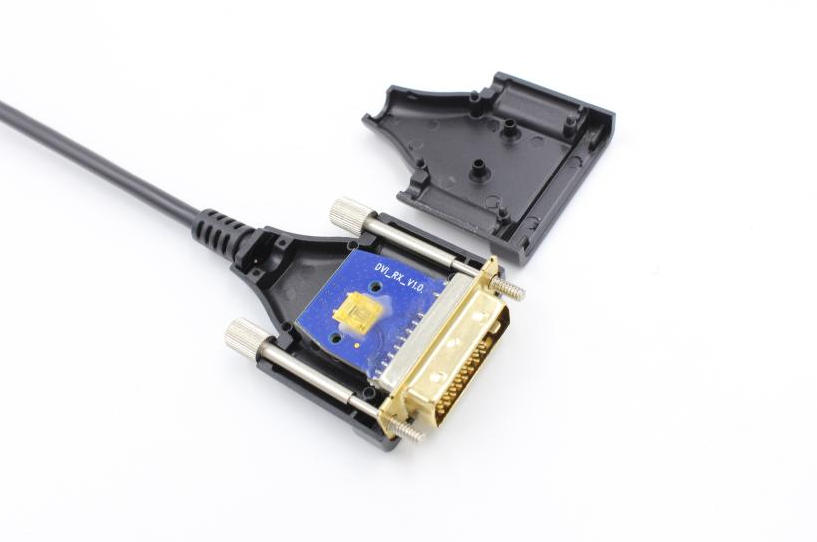
DVI (Digital Visual Interface) was introduced in 1999 to transmit uncompressed digital video to displays. It uses TMDS technology to deliver high-speed, low-noise digital signals. Single-link DVI supports up to 1920×1200 at 60 Hz, while dual-link supports up to 2560×1600 at 60 Hz. There are three types: DVI-A (analog), DVI-D (digital), and DVI-I (both), with DVI-I being backward compatible with VGA.
A DVI cable is a video transmission standard designed to deliver high-quality digital signals between a source device (such as a GPU or industrial controller) and a display. Unlike HDMI, DVI focuses on video-only transmission, which makes it widely used in environments where stable, interference-resistant imaging is critical.
Traditional copper DVI cables are limited by transmission distance and signal attenuation. This is where a DVI fiber optic cable—also known as DVI AOC—offers a significant advantage. By converting electrical signals into optical signals, DVI AOC solutions enable:
Long-distance transmission (often up to 100 meters or more)
Immunity to electromagnetic interference (EMI/RFI)
Consistent, lossless signal quality over extended runs
As a result, DVI AOC products are increasingly adopted in professional AV systems, medical imaging, industrial control, and digital signage applications where reliability and signal integrity are essential.
DVI cables are primarily used for transmitting high-quality video signals in scenarios where stability and compatibility are more important than advanced multimedia features.
Common use cases include:
Industrial control systems and factory automation
Medical imaging equipment requiring precise visuals
Digital signage and control rooms
Legacy monitors and professional display systems
In modern deployments, especially where long-distance or high-interference environments are involved, a DVI fiber optic cable (DVI AOC) is often preferred over traditional copper cables. From an AOC industry standpoint, DVI AOC solutions are designed to overcome key limitations by providing:
Extended transmission distances without signal degradation
Lightweight and flexible cable structure compared to thick copper DVI
High reliability in complex electromagnetic environments
This makes DVI AOC an optimal choice for integrators and engineers who need dependable video transmission in mission-critical applications, even as newer interfaces like HDMI continue to evolve.
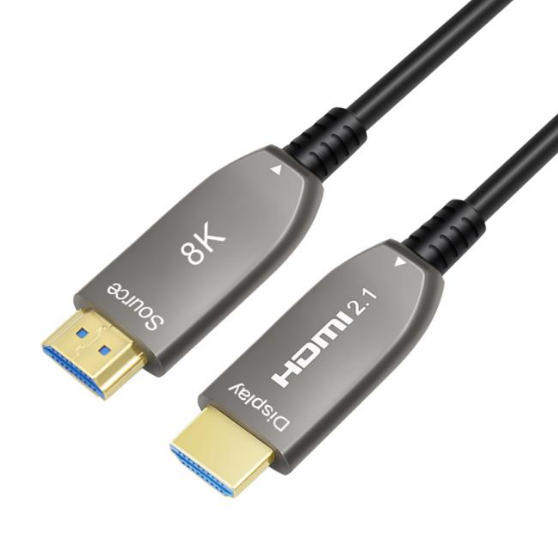
HDMI (High-Definition Multimedia Interface) was first introduced on April 16, 2002, with version 1.0. It has largely replaced DVI because it can transmit both digital video and compressed or uncompressed audio through a single cable. HDMI is commonly used to connect source devices to displays, soundbars, and TVs. Over time, HDMI has evolved through versions such as HDMI 1.4, 2.0, and 2.1. HDMI 2.1 supports ultra-high speeds of up to 48 Gbps and resolutions up to 10K at 120 Hz. To fully leverage these capabilities in real-world installations, especially for high-resolution and high-bandwidth applications, using a certified 8K HDMI 2.1 cable is essential to ensure stable signal transmission and optimal performance.
DVI and HDMI are easy to distinguish due to their different designs. DVI has a large rectangular connector with varying pin configurations: DVI-A has 11 pins, DVI-D has 19 pins (single-link) or 25 pins (dual-link), and DVI-I has 23 or 29 pins for single- and dual-link respectively. In contrast, HDMI features a slimmer, beveled rectangular connector, with Type-A typically having 19 pins.
DVI is commonly found in older computers and professional setups, while HDMI is now more widely used. Its compact design makes it compatible with most modern devices, including TVs, monitors, laptops, and game consoles. HDMI is also backward compatible with DVI via adapters.
DVI is designed to transmit both analog and digital video signals for some old monitors and video projects. This means that you need to find an extra cable used for sending audio information. DVI supports the bandwidth of 3.96 Gbit/s, up to 1920 × 1200 resolution at 60 Hz refresh rate in the single-link DVI connection, and supports the bandwidth of 7.92 Gbit/s, up to 2560 × 1600 resolution at 60 Hz in the dual-link DVI connection.
HDMI can handle high-definition video and up to 32-channel audio signals, making it a future-proof choice for modern displays. HDMI 2.0 supports up to 18 Gbit/s and ultra HD 4K resolution at 60 Hz, and HDMI 2.1 can carry a maximum of 48 Gbit/s bandwidth with a maximum resolution of 10K at 120 Hz.
| Feature | DVI (Digital Visual Interface) | HDMI (High-Definition Multimedia Interface) |
|---|---|---|
| Primary Function | Video-only transmission | Video + audio transmission |
| Audio Support | Not supported | Fully supported (digital audio included) |
| Typical Use Case | PCs, monitors, industrial systems | TVs, gaming, home theater, modern displays |
| Maximum Resolution | Up to 2560×1600 (dual-link, limited) | Up to 10K (HDMI 2.1 with 8K HDMI 2.1 cable support) |
| Connector Size | Larger, older design | Smaller, modern compact interface |
| Cable Technology Upgrade | DVI AOC available for long-distance lossless transmission | HDMI AOC and standard HDMI cables widely available |
| Gaming Performance | Stable for 1080p/1440p, no audio | Better support for high refresh rates and modern gaming features |
| Compatibility | Often requires adapters for modern devices | Broad compatibility with modern devices and TVs |
| Industry Trend | Legacy + professional display systems | Mainstream standard for consumer and professional AV |
Although DVI and HDMI share some similarities, they are suited for different applications. DVI is largely outdated in modern devices, but it remains useful for legacy equipment. It is still commonly used with older projectors in conference rooms or classrooms that only support DVI input.
HDMI, on the other hand, is a newer and widely adopted standard. It is the preferred choice in modern meeting spaces with updated projectors due to its ability to transmit high-quality audio and video. HDMI also plays a key role in home entertainment systems, delivering excellent performance for gaming consoles, Blu-ray players, and streaming devices. Its support for high-definition content and immersive sound makes it suitable for virtual reality and esports applications as well.
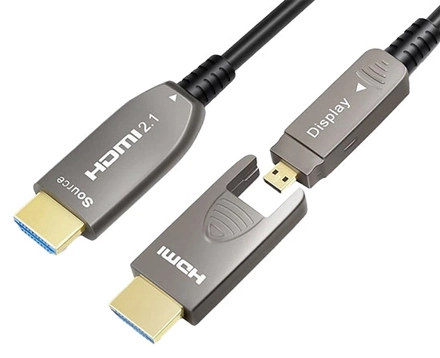
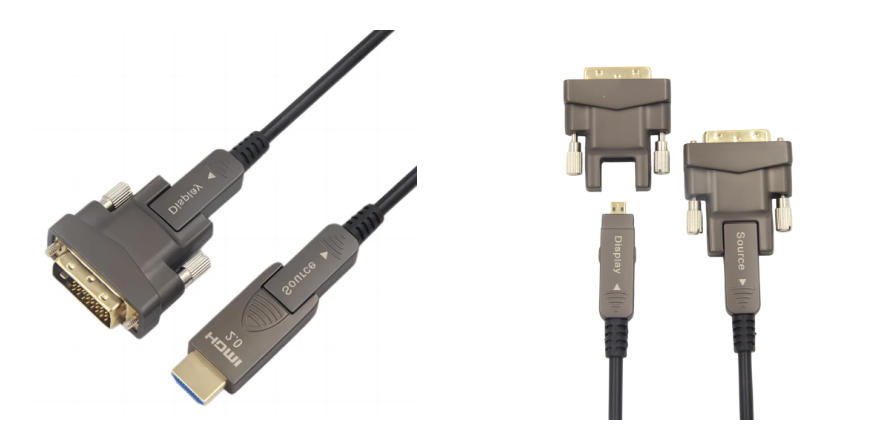
Due to the varying interface types across different devices, many users have sought a reliable solution to convert DVI to HDMI. To address this specific demand, AOCFIBERLINK developed a detachable DVI fiber optic cable that supports conversion from DVI to both HDMI Type-A and Type-B. This fiber-based DVI solution not only enhances overall performance but also significantly extends transmission distance. Thanks to its optical transmission design, it can deliver stable signal transmission up to 100 meters without loss. The cable supports data rates of up to 10.2 Gbps, enabling 2K and 1080p resolutions, and is fully compliant with EDID and HDCP standards to ensure compatibility and secure content transmission.
With extensive experience in high-speed signal integrity, optical-electrical conversion, and OEM/ODM cable solutions, AOCFiberlink is well positioned to support the evolving GPMI ecosystem as it expands from early products into broader consumer and professional markets.
At AOCFiberlink, we specialize in high-performance AV and data transmission products including fiber optic HDMI 2.1, DisplayPort, USB4, and USB-C active cables for global OEM/ODM markets. With a deep understanding of emerging interface trends like GPMI, we help our clients stay ahead of the curve.
Contact us today to learn more or request a custom solution.
In most cases, HDMI is better because it supports both audio and video, along with higher resolutions and modern features like HDR. However, DVI is still reliable for pure video transmission and works well with older devices. For long-distance setups, a DVI fiber optic cable can maintain stable, high-quality signals.
The main difference is that HDMI carries both audio and video, while DVI supports video only. HDMI also offers better support for newer resolutions and features. When choosing HDMI or DVI, HDMI is typically preferred for modern systems, while DVI suits legacy equipment.
HDMI is generally better for gaming due to higher refresh rates and support for advanced features. DVI can still deliver solid performance for 1080p gaming, but lacks audio and newer capabilities. For extended setups, a DVI fiber optic cable can help ensure stable gameplay without signal loss.
Standard DVI has limited support for 4K and is not ideal for modern high-resolution needs. HDMI is a better choice for 4K and beyond. If distance is a concern, a dvi fiber optic cable may improve signal transmission, but HDMI remains the more future-proof option.
Choose DVI if you are using older monitors, need a dedicated video-only signal, or require stable transmission in specialized environments. In long-distance applications, combining DVI with a DVI fiber optic cable can be highly effective.
Yes, HDMI and DVI are compatible via adapters because they share the same digital video signal. However, audio will not transmit when converting to DVI. When deciding between HDMI or DVI, compatibility needs often make adapters a practical solution.
Copyright © Shenzhen Fiberlink Tech Co., Ltd. All Rights Reserved. Trusted Partners:https://www.aocfiberlink.com/